Free for Mac

alSpot

Album player for Spotify and Apple Music

Your albums, as covers, on every speaker in the house.

alSpot puts the albums you saved on Spotify and the ones in your Apple Music library side by side, and plays them wherever you like: the Mac, a HomePod, an Apple TV, or the old AirPlay speaker that newer apps forgot about.

No ads, no tracking, no account with us. Works with just your Apple Music library; Spotify is optional.

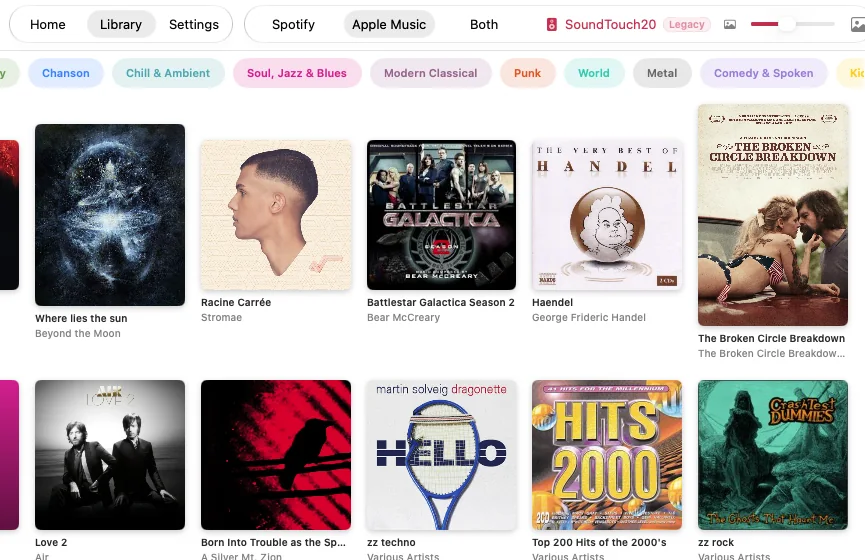
alSpot on the Mac: the Library, with Spotify, Apple Music and Both at the top, a SoundTouch speaker marked Legacy, genre buttons, and a grid of album covers
What it does

Made for listening to whole albums

Streaming apps are built around playlists and endless feeds. alSpot is for picking an album by its cover, pressing play, and letting it run.

One shelf for both

Browse the albums you saved on Spotify, your Apple Music library, or both mixed together. Make the covers bigger or smaller, show or hide their titles, and hide albums with only a few tracks.

Recently played and Discover

Home shows what you played lately and a Discover selection you can shuffle or narrow down by genre. Genres follow the tags in your Music library: 17 of them, from Post-Rock and Chanson to Modern Classical.

Every speaker

Play to the speakers on your network: Apple TVs, HomePods, and older AirPlay 1 speakers like a Bose SoundTouch, marked “Legacy”. The volume slider sets the volume of the speaker that's playing.

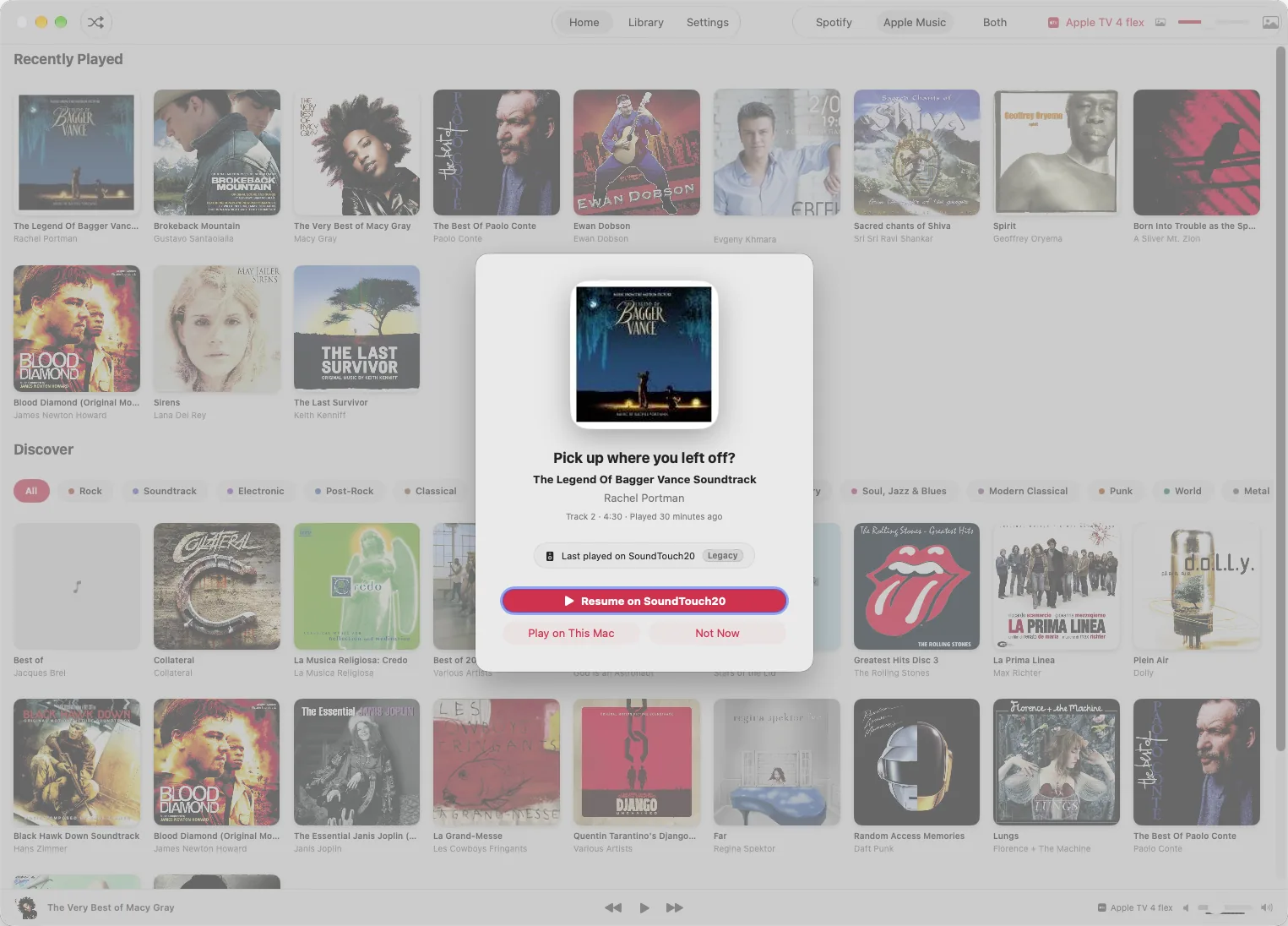
Pick up where you left off

When you open alSpot, it offers to carry on with the album you were playing, on the speaker you were using. On the Mac it also picks up music that's already playing in the Music app.

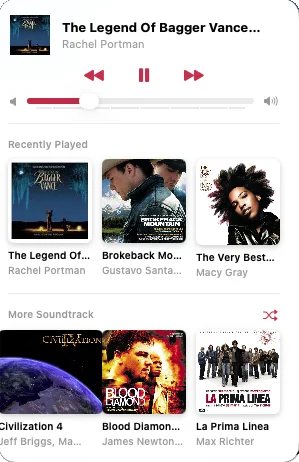
Right in the menu bar

Play, pause, skip and change the volume from the Mac menu bar, with your last three albums and three more from the same genre a click away.

Quiet when you talk

Music pauses while a microphone is in use, for dictation or a call, even one in another user account on the same Mac. It picks back up when the microphone turns off.

On the Mac

A closer look

Spotify, if you want it

One small setup step for Spotify

Apple Music works straight away: alSpot asks to read your library and that's it. You can use alSpot with just Apple Music and never think about Spotify.

For Spotify, alSpot is a remote control. The music plays through Spotify itself, on a computer, phone or speaker signed in to your account, and alSpot tells it what to play. You need Spotify Premium, because Spotify only lets apps start and control playback for Premium accounts.

Spotify also only lets a small app like this one sign in people its developer has added by hand. So instead of sharing ours, alSpot lets you use your own free Spotify developer key, called a Client ID. It takes about two minutes.

  • Spotify on a Mac or PC
  • Spotify on a phone
  • Spotify Connect speakers
  1. Open the Spotify developer dashboard, sign in with your Spotify account and click Create app.
  2. Give it any name and description. Under Redirect URIs, add alspot://callback. Tick Web API, then save.
  3. Open the app's Settings in the dashboard and copy its Client ID.
  4. In alSpot, paste it into Spotify Client ID (on the Connect screen, or in Settings › Spotify Account), then click Connect to Spotify.

Good to know

  • alSpot talks only to Spotify (once you connect it) and to the speakers on your network. Your Apple Music library stays on your Mac. No ads, no analytics.
  • Spotify doesn't share your listening history with small apps like this one, so “Recently played” for Spotify only shows albums you started from alSpot.
  • This download can't use iCloud, so your Spotify history stays on your Mac and doesn't sync to your iPhone or iPad.
  • alSpot also runs on iPhone and iPad, but there's no public version for them yet.
What's new

Four versions in, and counting

The same list is in the app, under Settings › What's New.

1.2.1 · Spotify history fix 23 October 2026

  • FixedSpotify albums you've played stay in Recently Played after you quit and reopen alSpot, including in the download from the website.
1.2 · Menu bar and auto-pause 22 October 2026

  • NewalSpot is now in the Mac menu bar, with play/pause, skip and volume, your last three albums, and three more from the same genre.
  • NewOn the Mac, music pauses while a microphone is in use, for dictation or a call (even one in another user account), and picks back up when the microphone is off.
  • NewA slider in the Mac toolbar makes album covers bigger or smaller.
  • NewSettings shows the app's version and this list of what's new.

1.1 · Better genres 22 October 2026

  • ImprovedGenres now follow the genre tags in your Music library, with 17 to choose from, including Soundtrack, Post-Rock, Chanson, Chill & Ambient and Modern Classical.
  • ImprovedGenres are sorted by how many albums they have. Kids and Comedy & Spoken come last and are left out of the Discover shuffle.
  • ImprovedAn album's genre now comes from most of its tracks, not just the first one.
  • FixedCompilations without an album artist show “Various Artists”.

1.0 · First version 22 October 2026

  • NewBrowse your albums from Spotify, your Apple Music library, or both mixed together.
  • NewHome shows what you played recently and a Discover selection you can filter by genre or shuffle.
  • NewPlay to the speakers on your network. On the Mac that includes Apple TVs and HomePods, and older AirPlay 1 speakers like a Bose SoundTouch, marked “Legacy”.
  • NewWhen you open alSpot, it offers to pick up where you left off, on the speaker you were using.
  • NewUse alSpot with just your Apple Music library, without a Spotify account.
Free download

Get alSpot for your Mac

No sign-up, no ads, nothing to buy.

Mac

For Apple silicon and Intel Macs running macOS 26.7 or later.

Download for MacalSpot-1.2.1-mac.dmg
First time opening it?
  1. Open the downloaded alSpot-1.2.1-mac.dmg and drag alSpot into Applications.
  2. Open alSpot. If macOS says it can't check the app, click Done.
  3. Go to System Settings › Privacy & Security, scroll down and click Open Anyway.

You only need to do this once. alSpot isn't notarized by Apple, so macOS asks before the first launch.

iPhone and iPad

alSpot runs on iPhone and iPad too, with the same albums and speakers. There's no public version yet.

Not on the App Store

Your download has started

alSpot isn't notarized by Apple, so macOS asks before you open it the first time. It takes a minute:

  1. Open alSpot-1.2.1-mac.dmg and drag alSpot into Applications.
  2. Open alSpot. macOS says it can't verify the app: click Done.
  3. Open System Settings › Privacy & Security, scroll down to Security and click Open Anyway next to “alSpot was blocked”.
  4. Confirm with your password or Touch ID. From then on it opens like any other app.
Why does macOS ask? Apps from outside the App Store open without a question only when they're signed with a paid Apple Developer ID and checked by Apple (notarized). alSpot is a free home-made app without that, so macOS asks you to confirm once. When alSpot opens, it asks for your Music library and to control the Music app: that's how it reaches every speaker.